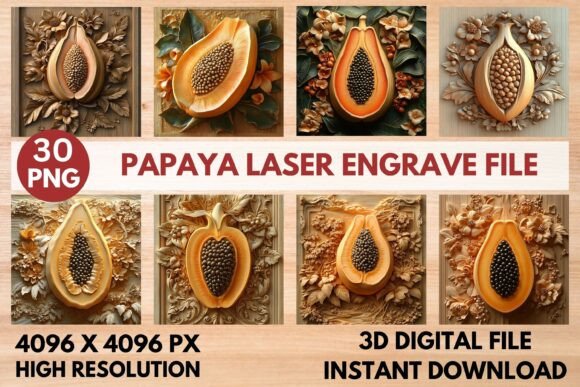
Papaya Laser Engrave File: A Versatile Design for Precision Engraving
The Papaya Laser Engrave File is a high-quality PNG design tailored for laser engraving projects. Whether you're a hobbyist, professional, or business owner, this file offers the detail and clarity needed to create stunning results on a variety of materials. With its optimized resolution and grayscale options, it's ideal for use with popular laser machines like Glowforge, LightBurn, xTool, Sculpfun, and CO₂ cutters.
What Is the Papaya Laser Engrave File?
The Papaya Laser Engrave File is a digital design that provides a ready-to-print format for laser engraving. It comes in both coloring and grayscale versions, ensuring versatility across different engraving needs. The file set includes 15 coloring PNGs and 15 grayscale PNGs, each at a high resolution of 4096x4096 pixels. This level of detail ensures that your engravings are sharp and precise, making it perfect for intricate designs.
Unlike SVG or layered files, the Papaya Laser Engrave File is a straightforward PNG set, which means it’s easy to use with most laser engraving software. It’s designed for users who want a hassle-free experience without the need for complex file editing.
Key Features and Benefits
The Papaya Laser Engrave File is engineered to deliver professional-grade results. Its high-resolution images ensure that even the finest details are captured accurately during the engraving process. This makes it an excellent choice for creating detailed artwork on wood, paper, fabric, and other common laser engraving materials.
One of the standout features is the availability of transparent background PNGs. This allows for greater flexibility when applying the design to different surfaces, as the background can be easily removed or adjusted based on your project needs.
For those using Glowforge, the recommended settings include a speed of 1000, power of 90, and grayscale vary power for optimal results. These settings help achieve maximum quality while maintaining efficiency. Similarly, LightBurn users are advised to use the Jarvis Dither Filter for the grayscale PNGs, ensuring smooth and consistent engraving.
Applications and Use Cases
The Papaya Laser Engrave File is incredibly versatile, making it suitable for a wide range of projects. Here are some common applications:
- Home Décor: Use the design to personalize wooden signs, picture frames, or decorative items that add a unique touch to any space.
- Wood Crafts: Create custom wooden coasters, cutting boards, or furniture embellishments with intricate patterns.
- Stationery: Apply the design to cards, notebooks, or calendars for a personalized and elegant look.
- Textiles: Engrave patterns onto fabric for custom clothing, bags, or accessories.
- Tableware: Add artistic touches to plates, mugs, or glassware for a distinctive dining experience.
- Fashion Prints: Use the design to create unique fabric patterns for garments or accessories.
- Packaging: Customize boxes, labels, or gift wraps with eye-catching designs.
- Paper Crafts: Incorporate the design into origami, scrapbooking, or handmade greeting cards.
Whether you're working on a personal project or a commercial endeavor, the Papaya Laser Engrave File offers the flexibility and quality needed to bring your ideas to life.
Who Can Benefit from This File?
The Papaya Laser Engrave File is ideal for a variety of users. Hobbyists looking to explore laser engraving will find it easy to use and highly effective. Professionals such as woodworkers, graphic designers, and craft makers can leverage the file to enhance their product offerings. Business owners aiming to create custom products for sale will appreciate the file's quality and ease of integration into their workflow.
Additionally, educators and students involved in art or design courses may find the file useful for teaching and learning about laser engraving techniques. Its clear, high-resolution images make it a great tool for demonstrating precision and detail in digital design.
Strengths and Considerations
The Papaya Laser Engrave File excels in delivering crisp, detailed results due to its high-resolution and optimized grayscale options. It’s also user-friendly, requiring no advanced technical skills to implement. This makes it accessible to a broad audience, including beginners and experienced users alike.
However, there are a few considerations to keep in mind. Since the file is a PNG set and not an SVG or layered file, it may not be suitable for users who require more complex editing or vector-based designs. Additionally, while the file is optimized for most laser engraving machines, the final outcome can still depend on the specific settings and materials used.
It’s also important to note that the Papaya Laser Engrave File is a digital download only. There is no physical product shipped, so users must have access to a laser engraving machine and the necessary software to utilize the file effectively.
Real-World Examples and Practical Tips
Imagine using the Papaya Laser Engrave File to create a custom wooden sign for a boutique shop. The high-resolution design would allow for intricate detailing, resulting in a professional-looking sign that stands out. Another example could be engraving a personalized gift, such as a cutting board with a family name or a special message, adding a personal touch to a practical item.
For those new to laser engraving, it’s helpful to start with simple projects before moving on to more complex designs. Experimenting with different materials and settings can help users understand how the Papaya Laser Engrave File performs under various conditions. Testing the file on a small scale before committing to a larger project is also a good practice.
Evaluating Suitability for Your Needs
When considering whether the Papaya Laser Engrave File is right for your project, think about the following factors:
- Project Complexity: If your design requires intricate details, the high-resolution PNGs will provide the best results.
- Material Type: The file works well with materials like wood, paper, and fabric, but may not be suitable for all surfaces.
- Software Compatibility: Ensure your laser engraving software supports PNG files and can handle the recommended settings.
- Technical Skills: While the file is easy to use, some basic understanding of laser engraving settings may be beneficial.
By assessing these factors, you can determine if the Papaya Laser Engrave File aligns with your specific requirements and capabilities.
Conclusion
The Papaya Laser Engrave File is a valuable resource for anyone involved in laser engraving. Its high-resolution design, grayscale options, and compatibility with multiple laser machines make it a reliable choice for a wide range of projects. Whether you're creating home décor, custom gifts, or commercial products, this file offers the precision and detail needed to achieve professional results.
As with any digital design, it’s important to understand the limitations and requirements of the file. However, for those looking to elevate their laser engraving projects, the Papaya Laser Engrave File is a strong and practical option that delivers exceptional value and performance.