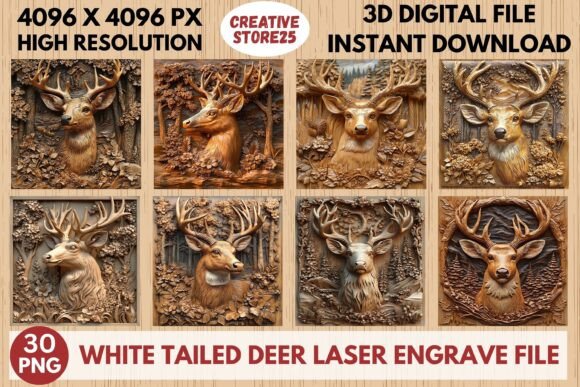
Mule Deer Laser Engrave File
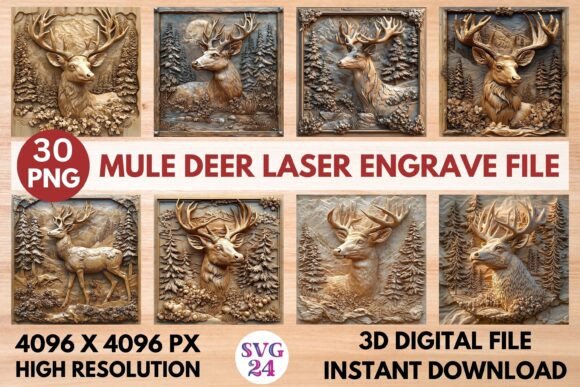
The Mule Deer Laser Engrave File is a high-resolution 3D grayscale PNG designed for laser engraving machines. This file captures the intricate details of a mule deer, offering a realistic and dynamic representation that can be used across various creative projects. Its 4096 x 4096 pixel resolution ensures clarity and depth, making it ideal for wood, textiles, and other materials that benefit from laser engraving.
Whether you're a designer, hobbyist, or small business owner, this file provides a versatile tool to bring your ideas to life. With its transparent background and ready-to-use format, it's compatible with popular software like Lightburn, xTool, Glowforge, Sculpfun, and CO2 laser cutting machines. The set includes 15 coloring PNG files and 15 grayscale PNG files, giving you flexibility in how you apply the design.
What Makes It Unique
The Mule Deer Laser Engrave File stands out due to its high-quality detail and adaptability. Unlike standard SVG cut files, these are flat PNG images, which means they are not editable or layered. However, their resolution and clarity make them perfect for direct engraving without the need for complex editing. This makes them particularly useful for users who prefer straightforward, ready-to-use designs.
The file's grayscale nature allows for a range of effects depending on the material and engraving settings. For instance, on wood, it can create a subtle, natural look, while on fabric, it might produce a more dramatic contrast. This versatility opens up numerous creative possibilities for different applications.
Creative Applications and Ideas
One of the most appealing aspects of the Mule Deer Laser Engrave File is its wide range of potential uses. Here are some practical ideas to inspire your next project:
- Home Decor: Use the design to engrave wooden signs, picture frames, or wall art. A mule deer engraving can add a rustic or natural touch to any space.
- Custom Wood Crafts: Create personalized items like cutting boards, bookends, or decorative boxes. The detailed image adds character and uniqueness to each piece.
- Stationery and Packaging: Apply the design to greeting cards, envelopes, or product packaging. It can elevate the aesthetic of your printed materials and make them stand out.
- Textiles and Apparel: Engrave the design onto T-shirts, tote bags, or hats. This is a great way to create custom merchandise for events, businesses, or personal use.
- Marketing Materials: Incorporate the design into promotional items like keychains, phone cases, or branded merchandise. It can serve as a memorable and eye-catching element in your branding strategy.
Adapting for Different Goals and Audiences
The Mule Deer Laser Engrave File can be tailored to suit different audiences and purposes. For example, if you're targeting outdoor enthusiasts, the design can be used to create gear or accessories that reflect a love for nature. For a more artistic audience, the file can be incorporated into gallery pieces or limited-edition prints.
Businesses can use the design to create unique products that resonate with customers. A local shop could offer custom-engraved items featuring the mule deer, attracting visitors looking for one-of-a-kind items. Educators might use the file to teach students about laser engraving techniques, combining creativity with technical skills.
For individuals, the file offers an opportunity to explore personal projects. Whether you're interested in woodworking, textile design, or digital art, the Mule Deer Laser Engrave File provides a foundation for experimentation and innovation.
Practical Tips for Success
To get the best results from the Mule Deer Laser Engrave File, consider the following tips:
- Check Compatibility: Ensure your laser engraving machine and software support high-resolution PNG files. This will help avoid issues during the engraving process.
- Test on Sample Material: Before working on your final project, test the design on a small piece of the intended material. This helps you adjust settings and achieve the desired outcome.
- Experiment with Settings: Adjust the laser power and speed based on the material you're using. This can enhance the visibility and quality of the engraving.
- Organize Your Files: Keep your design files organized, especially if you're working on multiple projects. This makes it easier to access and reuse the Mule Deer Laser Engrave File when needed.
- Stay Inspired: Look for inspiration in nature, art, and other creative works. This can help you find new ways to apply the design and keep your projects fresh and engaging.
Unlocking Creativity with the Mule Deer Laser Engrave File
The Mule Deer Laser Engrave File is more than just a design—it's a gateway to creativity. By understanding its features and potential applications, you can unlock new opportunities for your work. Whether you're creating for personal enjoyment, professional use, or commercial purposes, this file offers a powerful tool to bring your vision to life.
With its high-quality resolution, adaptable format, and wide range of uses, the Mule Deer Laser Engrave File is a valuable addition to any creative toolkit. Explore its possibilities, experiment with different techniques, and let your imagination guide you toward unique and meaningful projects.